Your infrastructure.
A little more familiar.
From your first SSH connection to your next investigation.
Practical guides for the desktop app and My Page.
Meet v3.3.0. Server details, ECS/Fargate access, Sentry diagnostics and language preferences. Current release. Feature access depends on your plan, permissions and workspace configuration.
Connect your first server
Install, unlock your vault and open a verified SSH session.
DESKTOP GUIDEFind your way around
Get comfortable with hosts, tabs and your desktop tools.
WEB GUIDEManage your account
Explore My Page, team access, billing and activity.
Meet your workspace.
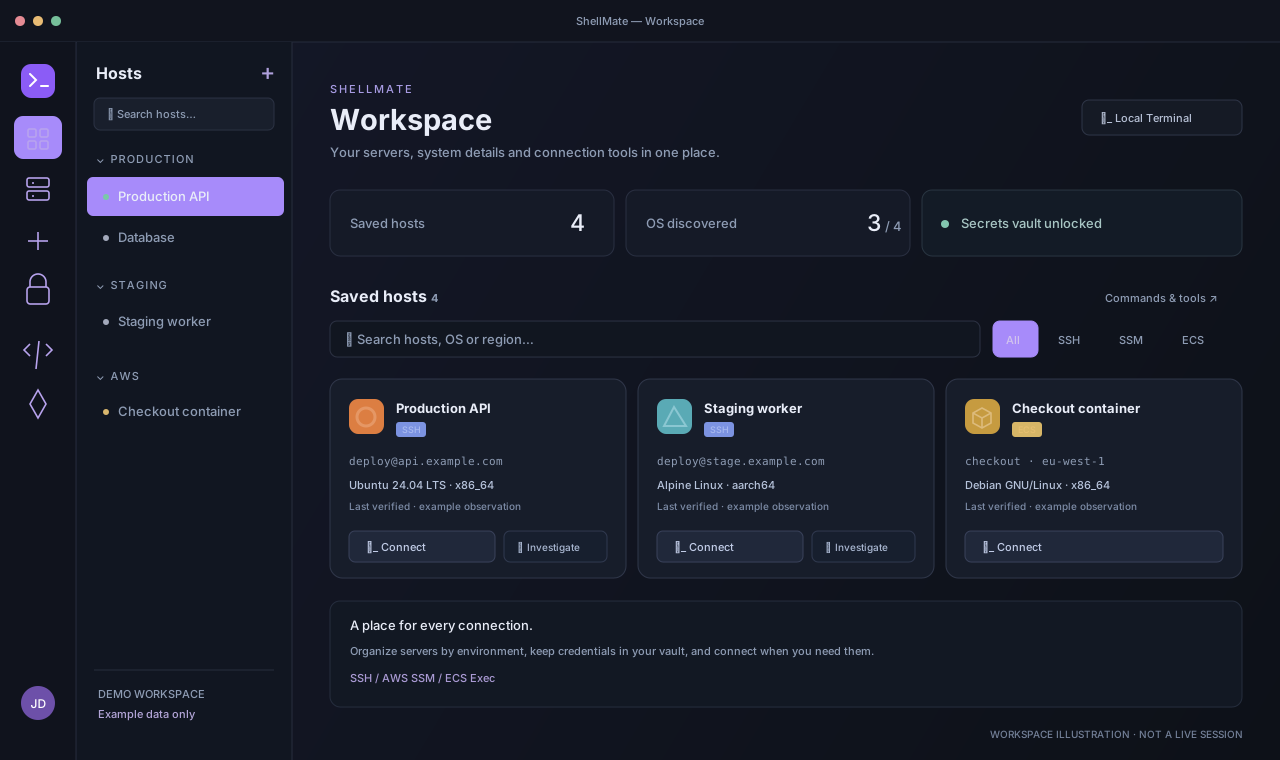
Find your hosts
Open Hosts in the navigation rail. Use the host drawer and workspace search to find the server you need.
Read the complete walkthrough
- Find your hosts. Open Hosts in the navigation rail. Use the host drawer and workspace search to find the server you need.
- Unlock the vault. Use Vault to manage your saved credentials. Unlock with the supported key flow before connecting with an encrypted credential.
- Read server details. The OS label and Last verified time describe a saved observation from a supported connection. Expand details for more information.
- Open a session. Choose Connect on the intended host. Complete authentication and wait for remote verification before treating it as connected.
Watch the 32-second overview Silent video · captions available
Recorded from the illustrated desktop and example My Page walkthrough. No audio or live infrastructure. Download video.
Video text transcript
- Desktop workspace: Find your hosts. Open Hosts in the navigation rail. Use the host drawer and workspace search to find the server you need.
- Desktop workspace: Unlock the vault. Use Vault to manage your saved credentials. Unlock with the supported key flow before connecting with an encrypted credential.
- Desktop workspace: Read server details. The OS label and Last verified time describe a saved observation from a supported connection. Expand details for more information.
- Desktop workspace: Open a session. Choose Connect on the intended host. Complete authentication and wait for remote verification before treating it as connected.
- My Page: Open Hosts. Choose Hosts in the My Page sidebar to browse the host catalog available to your account.
- My Page: Narrow the list. Use the group filter or search to find a server. The browser displays saved metadata; it does not open an SSH terminal.
- My Page: Inspect observations. Expand a host’s OS details. Last verified is historical, and Not detected yet means a supported connection has not saved an observation.
- My Page: Manage your account. Use Settings for profile, security and language preferences, or Support for help. Other navigation items depend on your role and plan.
Find your next step.
Start here
Your first connectionDesktopHosts & server detailsDesktop + My PageNavigate your desktopDesktopVault, keys & device trustDesktop + My PageConnections
AWS SSM & ECS/FargateDesktopTunnels & port forwardingDesktopImport your SSH configurationDesktopConnection fields & capability referenceDesktop + My PageInvestigate
Sentry application errorsDesktop + My PageInvestigate with ShellMate AIDesktopGitHub Actions delivery contextOrganization workspaceCloudWatch runtime evidenceDesktop · AWSAccount & team
Your My Page dashboardMy PageTeam access & permissionsMy PageSettings, languages & updatesDesktop + My PageBilling, plans & AI usageMy PageNotifications & support ticketsMy PageProgrammatic APIMy Page + REST APIHost tools
Transfer & edit filesDesktop · SSHDocker containersDesktop · SSHRead & investigate logsDesktop · SSHMySQL & Redis toolsDesktop · SSHManage systemd servicesDesktop · SSHScheduled tasksDesktop · SSHReusable command snippetsDesktopGit workspaceDesktop · SSHSystem & process monitorDesktop · SSHNetwork portsDesktop · SSHNginx sites & serviceDesktop · SSHPM2 applicationsDesktop · SSHProxmox host toolsDesktop · SSHDesktop for doing.
My Page for managing.
Open remote sessions and work with your vault on the desktop. Use the browser to review host observations, activity and account settings.
Explore My PageNeed a hand?
Find connection checks and what to include in a support request.
Manual updated October 20, 2026 · Covers v3.3.0 · Illustrations use example data.